

How Maitento works
Maitento runs AI agents for you. You describe what should happen in small text files, deploy them, and then start runs from your own code. Maitento does the rest: it calls the models, runs the tools, keeps the conversation, remembers, retries, and tells you when a run is done.
There are only a handful of ideas to learn.
Definitions and runs
Section titled “Definitions and runs”Everything in Maitento is either a definition or a run.
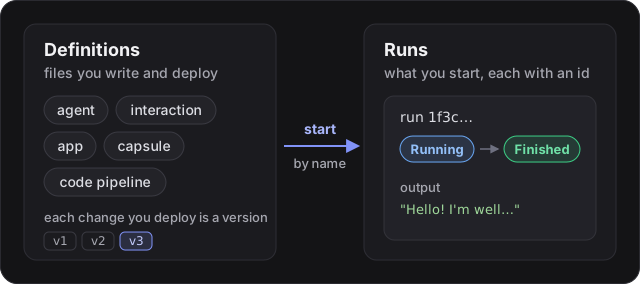
- A definition describes something: an agent, an interaction, a tool, an app. You write definitions as files and deploy them. Every deploy that changes a definition creates a new, numbered version.
- A run (Maitento also calls it a process) is one execution of a definition. You start a run by name, it gets
an id, and it moves through statuses such as
RunningandFinished.
The building blocks
Section titled “The building blocks”| You want to… | Use | Read |
|---|---|---|
| Give a model a role and instructions | an agent | Agents |
| Put agents to work on a task | an interaction | Interactions |
| Get JSON back instead of prose | a response schema | Structured output |
| Let an agent call an API, including yours | a tool | Tools |
| Let an agent search and read the web | web tools | Web tools |
| Answer from your own documents | a knowledge base | Knowledge |
| Give agents and sandboxes files | a virtual file system | File systems |
| Have several agents work together | teams | Teams of agents |
| Let an agent remember people across runs | memory | Memory |
| Write logic around your agents | an app | Apps |
| Run code in a throwaway Linux machine | a capsule | Capsules |
| Run coding agents on a git repo | a code pipeline | Code pipelines |
| Start things on a schedule | an automation | Automations |
The tutorials introduce these one at a time, and tutorial 23, Support desk puts most of them together in one small web app.
Namespaces
Section titled “Namespaces”Definitions live in a namespace, a named folder for one project. A namespace is created the first time you deploy
to it. Names only need to be unique within a namespace, so two projects can both have an agent called assistant.
Your tenant, your keys
Section titled “Your tenant, your keys”Your organisation is a tenant. Everyone in it signs in to the portal and can create API keys for code. Maitento runs agents on your own account with the model provider: you add a model key once, and every run uses it. To run different work on different accounts, such as each of your customers on their own key, use credentials and credential stacks.
Talking to Maitento
Section titled “Talking to Maitento”There are four ways in, and they all do the same things:
- The portal, a web console where you write, deploy and watch everything.
- The SDKs for TypeScript, Python and C#.
- The
mtcommand line. - The REST API, if your language has no SDK. Every API page shows the curl command.
Knowing when a run is done
Section titled “Knowing when a run is done”Runs take seconds to minutes. You can wait for one in three ways, described in Runs and events:
- the SDKs’
run()helpers, which start a run and wait for it; - live events over a WebSocket, including the model’s reply as it streams;
- webhooks, where Maitento calls your server when a run changes.
