

Runs and events
Starting anything — an interaction, an app, a capsule, a code pipeline — returns a run straight away, in status
New. A worker picks it up within a second or two, or, when all your plan’s lanes for that kind of run are in use, as
soon as one is free (see Limits). There are three ways to know when it’s done.
1. Wait for it
Section titled “1. Wait for it”The SDKs’ run() helpers start a run and return when it ends. They watch it over a live connection when one is open,
and otherwise check on it every few seconds:
const run = await mt.interactions.run("hello");run = mt.interactions.run("hello")var run = await mt.Interactions.RunAsync("hello");mt interaction-run helloWithout an SDK, fetch the run until its status is final:
curl https://api.maitento.com/interactions/processes/by-id/<run id> -H "Authorization: $MAITENTO_AUTH"To check many runs of any kind at once, GET /processes?ids=<id>,<id> returns a short summary of each.
Every status is in one of three groups, and the group says what to do:
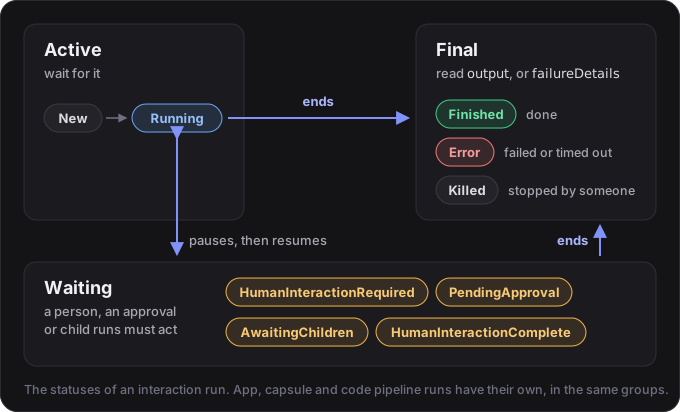
What each interaction status means is in Interactions.
See it in tutorial 4: start a run without waiting, read it back, list runs and cancel one.
2. Watch it live
Section titled “2. Watch it live”Maitento sends events over a WebSocket as runs change, including the model’s reply word by word as it’s written:
const events = await mt.events.connect();events.on("interaction-process-stream", (e) => process.stdout.write(e.stream), { id: run.id });events = mt.events.connect()events.on("interaction-process-stream", lambda e: print(e.data.stream, end="", flush=True), id=run.id)await mt.Notifications.StartAsync();mt.Notifications.Subscribe(new PrintReply(), run.Id);
// Each kind of event has a handler interface. This one is given the reply as it's written.class PrintReply : INotificationClientHandlerInteractionStream{ public Task OnInteractionStream(InteractionStreamUserNotification e, string messageHash) { Console.Write(e.Stream); return Task.CompletedTask; }}| Event | Sent when |
|---|---|
interaction-process-stream | the model writes more of its reply (type: "Chat") or calls a tool (type: "Function") |
interaction-process-updated | an interaction run changes; carries the whole run |
app-process-updated, capsule-process-updated, code-pipeline-process-updated | those runs change |
ingested-file-updated | a file uploaded to a knowledge base is processed |
process-updated | any run in the tenant changes (with scope=tenant only; a short summary) |
To show a reply as it’s written, you don’t need to connect first: give run() a token callback (onToken,
on_token, OnToken) and it opens the connection for that run when none is open, then closes it when the run ends.
Open one yourself, as above, to keep it for many runs or to hear the other events.
Things to know:
- Events go to the person who started the run. Connect with
scope=tenantto see a summary of every run in your tenant. - Events are best effort. If the connection drops, events in between are lost, so the SDKs re-read the run when they reconnect. Streamed text is for showing progress; the finished run is the record.
- Stay connected by sending something every 30 seconds. The SDKs do this for you.
Tutorial 5 streams a story into the terminal.
See it in tutorial 12: follow a run live, watch every run, and catch up after a reconnect.
3. Get called back (webhooks)
Section titled “3. Get called back (webhooks)”A webhook makes Maitento call your server whenever a run changes, so a backend never needs to keep a connection open. Register a URL and a secret for a kind of run:
await mt.webhooks.create({ type: "InteractionProcess", url: "https://example.com/maitento/webhook", secret });mt.webhooks.create(type="InteractionProcess", url="https://example.com/maitento/webhook", secret=secret)await mt.WebHooks.CreateAsync(WebHookType.InteractionProcess, "https://example.com/maitento/webhook", secret, headers: []);mt webhook-set -t InteractionProcess -u https://example.com/maitento/webhook -s "$WEBHOOK_SECRET"The webhook kinds are InteractionProcess, AppProcess, CapsuleProcess, CodePipelineProcess,
IngestedFile and Billing. A Billing webhook is delivered a BillingNotice
when your tenant runs out of credit or gets it back, uses up an allowance, or runs low on balance (see
Limits). It’s also delivered one when your plan changes, when a renewal payment fails (with
reminders 7, 21 and 28 days later, while it’s still unpaid), and when an automatic top-up can’t be charged. Your
tenant’s admins are emailed the same notices.
A webhook belongs to your tenant, not to the person who registered it. It hears about every run of its kind
in the tenant, including runs other people start, and each delivery carries the whole run: for an interaction
run, its inputs, its output and the conversation. Treat what your receiver gets as you would your own data, and filter
on what you care about, such as the interaction (interaction.id).
What your server receives:
PUT /maitento/webhookContent-Type: application/json; charset=utf-8X-MT-WebHook-Type: InteractionProcessX-MT-WebHook-AssociatedId: <run id>X-MT-WebHook-Timestamp: <when it was signed, in Unix seconds>X-MT-WebHook-Signature: v1=<signature>
{ ...the run's current state, exactly as the API returns it... }
What your server must do:
- Check the signature, against the raw body, before you parse it. Only Maitento and you know the secret, so a
signature that matches proves the delivery came from Maitento and wasn’t changed on the way. The secret itself is
never sent, so someone who sees a delivery can’t make another. The timestamp is signed too: refuse a delivery
whose timestamp is more than 5 minutes from your clock, so one that was recorded can’t be sent to you again later.
Each try of a delivery is signed afresh. Use an
httpsURL too, so nobody can read the run on the way. - Answer 2xx quickly, within 100 seconds, and do the work afterwards.
- Handle repeats. A delivery is sent at least once and may repeat. Updates in quick succession are merged, so
you might not see every state in between, but a run’s final state is always delivered. Keep the newest
dateUpdatedfor each run and ignore anything older.
The SDKs have helpers for the first step and for reading the body: verifyWebhook(headers, body, secret) and
parseWebhook(headers, body) in TypeScript, verify_webhook(headers, body, secret) and parse_webhook in Python,
and MaitentoWebhooks.Verify(header, body, secret) and MaitentoWebhooks.Parse in C#. Verifying checks the signature
and the timestamp (each takes another tolerance than 5 minutes if you need one), and parsing gives you the kind of run
and the run itself, typed. Pass the body exactly as it arrived: JSON that was parsed and written out again can come
out different, and then the signature won’t match. To test your receiver, signWebhook (sign_webhook,
MaitentoWebhooks.Signature) signs a delivery of your own.
Without an SDK, a signature is checked like this:
- Read
X-MT-WebHook-Timestamp, and the body as raw bytes. - Work out the HMAC-SHA256 of the timestamp, a full stop, and the body (
{timestamp}.{body}), keyed with your secret’s UTF-8 bytes. Write it as lowercase hex, afterv1=. - Compare that, in constant time, with each
v1=value inX-MT-WebHook-Signature. The header can carry several, separated by commas, and any one that matches will do. - Refuse the delivery if the timestamp is more than 5 minutes from your clock, either way.
A webhook registered before deliveries were signed also still gets its secret in X-MT-WebHook-Secret, so an older
receiver keeps working. A new webhook doesn’t. Check the signature instead. Reading a webhook tells you which kind it
is: signedOnly is true when its deliveries are only signed, and false when they also carry the secret.
Once your receiver checks the signature, stop sending it the secret. Update its webhook with signedOnly: true
(PUT /web-hooks/by-id/{id}). Here hook is the webhook, as webhooks.get(id) or webhooks.list() returns it:
await mt.webhooks.update(hook.id, { url: hook.url, signedOnly: true });mt.webhooks.update(hook.id, url=hook.url, signed_only=True)await mt.WebHooks.UpdateAsync(hook.Id, hook.Url, null, hook.Headers, signedOnly: true);mt webhook-set -t InteractionProcess -u https://example.com/maitento/webhook -s "$WEBHOOK_SECRET" --signed-onlyThis only goes one way: nothing turns the secret header back on. Leaving signedOnly out, or sending false, changes
nothing.
When a delivery fails (any answer but a 2xx, or none within 100 seconds), Maitento tries it again: six tries in all, the first three within seconds of each other and then 2, 4 and 8 minutes apart, about 14 minutes from first to last. After the sixth, that update is given up and never sent again. Nothing about the run is lost: its final state is still there to read, so after an outage read the runs you care about.
The delivery log shows every update sent to a webhook: how many tries it took, when the next one is due, and why
the last one failed. It keeps delivered updates for 24 hours and given-up ones for 7 days. Read it with
webhooks.deliveries(id) (GetDeliveriesAsync in C#), mt webhook-delivery-list <webhook id>,
GET /web-hooks/by-id/{id}/deliveries, or the portal’s Webhooks page.
Maitento only delivers to addresses on the public internet. A URL that is localhost, a loopback, private or
link-local address, or an internal name such as receiver or *.internal, is refused when you register it, with the
code api:webhooks:address-blocked. A name that resolves to such an address is checked on every delivery: that
delivery fails, and the delivery log says why, with the same code. Any port is fine. Maitento doesn’t follow
redirects, so a delivery never goes anywhere but the address you registered: register the final address.
See it in tutorial 11, Know when it’s done, which builds a receiver in TypeScript, Python and C#, reads the delivery log, and breaks it on purpose to watch a failed delivery tried again.
Stopping a run
Section titled “Stopping a run”await mt.runs.kill(run.id, { type: "Interaction" });mt.runs.kill(run.id, type="Interaction")await mt.Processes.KillAsync(run.Id, ProcessType.Interaction);mt kill -t Interaction -i <run id>A kill is final: after a moment the run ends as Killed, with no answer, and can’t be resumed. Only a live run can
be killed. The kill names the kind of run (Interaction, App, Capsule or CodePipeline), because it works for
all of them. See it in tutorial 4.
How long runs are kept
Section titled “How long runs are kept”Finished runs are deleted after your tenant’s retention period: three days unless your tenant has a different
setting. A tenant admin can change it with tenant.setRetention({ hours }) (set_retention in Python,
TenantRetention.SetAsync in C#) or PUT /tenants/self/retention, up to the longest your plan keeps runs
(planMaxHours in tenant.retention()). When your plan gets smaller, a longer setting comes down to its maximum.
To keep a run, retain it (PUT /processes/{type}/{id}/retention-lease), and release it when you’re done. Retaining
a run keeps every run it started too. A retained run is kept for at most your plan’s maximum from when you retained
it: the run’s retention status says when, in leaseEndsAtUtc. After that the lease is released, and the run is kept
only for your retention period from when it finished, so a run that finished long ago is deleted soon after.
Every run records the tokens each model used, and every web search and page fetch. See it in the portal’s Usage
page, or with mt usage-summary, mt usage-series and mt usage-breakdown.
