

1. Hello, agent
Every Maitento project works the same way: you write a few small text files, deploy them, and start a run from your code. This lesson goes through that loop once, slowly, with an agent that answers “Hello, how are you?”. If you did Get started, you have already run this code. This time you’ll see what each part does, because every later tutorial builds on it.
You’ll learn
- what an agent is, and what an interaction is
- what a deploy does, and why deploying twice changes nothing
- what a run is, how to read its answer, and where to find it in the portal
New concepts: agents · interactions · projects and deploys · runs
Builds on: Get started
Time: ~10 min · Cost: under $0.01 on DeepSeek · Needs: nothing beyond Get started
1. Write the agent
Section titled “1. Write the agent”An agent is a model with standing instructions. It is a definition: it does nothing until something puts it to work.
// The model this agent runs on. See the names you can use with `mt aimodel-list`.model = @ref("deepseek.deepseek-v4-flash")prompt = "You are a friendly assistant. Keep every answer to one or two sentences."summary = "A friendly assistant"modelis the model it runs on. Maitento calls it with your model key for that provider.promptis the system prompt: who the agent is and how it behaves, in every job it does.summaryis one line about the agent for other agents, such as a router choosing who should answer (tutorial 6). Every agent needs one.
The folder says what a file is, and the file name is its name: agents/greeter.mtr is the agent greeter.
2. Write the interaction
Section titled “2. Write the interaction”An interaction is a job you can run. It says who takes part and what they work on. This one seats the greeter,
gives it one task and returns one answer, so it is a one-shot interaction, in interactions/one-shot/:
// A one-shot interaction: one agent, one task, one answer.agent = { name = "Greeter" agent = @ref("greeter")}task = "Hello, how are you?"agent is the seat. name is what the agent is called in this interaction, and @ref("greeter") says which agent
sits there. An @ref points at another definition by its name.
Why two files? The agent is who, the interaction is what to do. Keeping them apart means one agent can do many jobs: the challenge at the end gives the greeter a second one.
Done when: your project folder holds these two files:
maitento/├── agents/│ └── greeter.mtr└── interactions/ └── one-shot/ └── hello.mtr3. Deploy it and run it
Section titled “3. Deploy it and run it”The script deploys the folder, then runs the interaction and prints the answer. The CLI does the same in two commands.
import { Maitento } from "@maitento/sdk";
// Reads your API key and namespace from MAITENTO_API_KEY and MAITENTO_NAMESPACE.const mt = new Maitento();
// Send the agent and the interaction in ../maitento to Maitento.await mt.deploy("../maitento");
// Start the "hello" interaction and wait for its answer.const run = await mt.interactions.run("hello");console.log(run.output);
from maitento import Maitento
# Reads your API key and namespace from MAITENTO_API_KEY and MAITENTO_NAMESPACE.mt = Maitento()
# Send the agent and the interaction in ../maitento to Maitento.mt.deploy("../maitento")
# Start the "hello" interaction and wait for its answer.run = mt.interactions.run("hello")print(run.output)#:package Maitento.Sdk@26.10.0
using Maitento.Sdk;
// Reads your API key and namespace from MAITENTO_API_KEY and MAITENTO_NAMESPACE.await using var mt = MaitentoClient.CreateFromEnvironment();
// Send the agent and the interaction in ../maitento to Maitento.await mt.DeployAsync("../maitento");
// Start the "hello" interaction and wait for its answer.var run = await mt.Interactions.RunAsync("hello");Console.WriteLine(run.Output);mt deploy ./maitentomt interaction-run helloRun it
Section titled “Run it”The finished project is examples/01-hello-agent in the public repo. Run the
script from its own folder, because ../maitento is relative to where you run it:
cd examples/01-hello-agent/typescriptnpm installnode hello.tscd examples/01-hello-agent/pythonpip install -r requirements.txtpython hello.pycd examples/01-hello-agent/csharpdotnet run hello.cscd examples/01-hello-agentmt deploy ./maitentomt interaction-run helloDone when: a one- or two-sentence reply is printed, something like this. The model writes it fresh each time, so your words will differ:
I am functioning well, thank you for asking. How may I assist you with your task today?4. What the deploy did
Section titled “4. What the deploy did”deploy sent the whole folder to Maitento as one build. Maitento compiled every file and checked every @ref,
and only then saved anything: version 1 of the agent greeter and of the interaction hello, in your namespace. If
any file is wrong, nothing is saved.
Deploy the same files again and nothing changes. The CLI shows it:
$ mt deploy ./maitentoDiscovered greeter in agentsDiscovered hello in interactions/one-shotCalling Maitento build service in namespace tutorials...Unchanged: Agent greeter (28c7349b-616b-43ba-af37-c57b5f979989)Unchanged: OneShotInteraction hello (5d6a867c-ae09-48a4-9886-5140518ed130)
Deployed to namespace 'tutorials' in 583ms: 2 unchanged.
Change a file and deploy, and that definition gets a new version. The old versions are kept.
5. What a run is
Section titled “5. What a run is”run("hello") did two things:
- It started a run: one execution of the interaction, with its own id. A Maitento worker sent the task to DeepSeek with your model key, and saved the reply.
- It waited until the run had finished, then returned it. The reply is in
output.
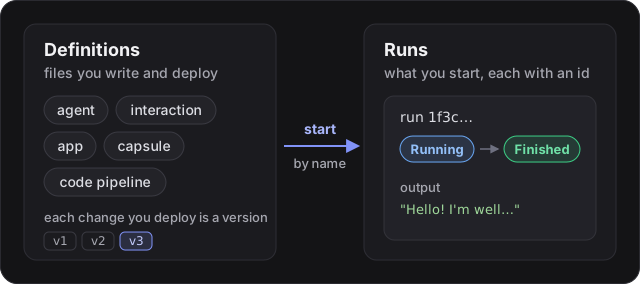
A run is a record that stays after it ends: its status, the conversation, how long it took and the tokens it used.
In the API a run is called a process, which is why the CLI prints a pid:
$ mt interaction-run helloConnecting to notification system...Connected to notification systemRequesting interaction start...Started 'hello@tutorials' with pid c2317a22-d579-47cc-8ed1-28357750ad8cStatus: RunningWaiting for interaction... (Ctrl+C stops watching; the run carries on)[Greeter] I'm doing well, thank you for asking. How can I assist you today?Output: I'm doing well, thank you for asking. How can I assist you today?Status: Finished[Greeter] is the seat’s name from hello.mtr. Tutorial 4 starts runs without waiting for them, and
checks on them later.
6. Find the run in the portal
Section titled “6. Find the run in the portal”Open Runs in the portal. Every run in your tenant is listed, newest first, with its status, when it started, how long it ran and the tokens it used.
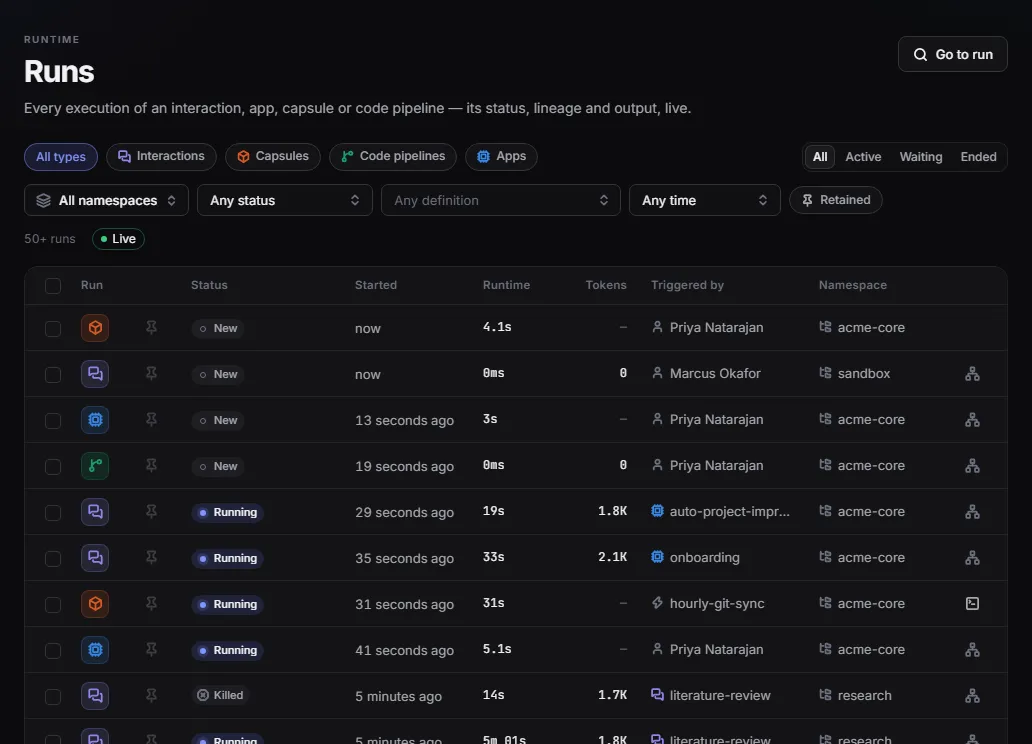
Done when: you can open your hello run and read the Greeter’s reply in its conversation.
All the files
Section titled “All the files”On GitHub: examples/01-hello-agent · TypeScript · Python · C#
All the files in this project (2)
// The model this agent runs on. See the names you can use with `mt aimodel-list`.model = @ref("deepseek.deepseek-v4-flash")prompt = "You are a friendly assistant. Keep every answer to one or two sentences."summary = "A friendly assistant"// A one-shot interaction: one agent, one task, one answer.agent = { name = "Greeter" agent = @ref("greeter")}task = "Hello, how are you?"Break it on purpose
Section titled “Break it on purpose”Misspell the agent’s name in hello.mtr, so the seat points at an agent that doesn’t exist:
agent = @ref("greter")Run the script again. The deploy refuses the whole folder, names the file and the reference, and saves nothing, so the run never starts:
BuildFailedError: The build failed with 1 error(s). First: Unable to resolve resource reference for agent 'greter' (hello.mtr)maitento.errors.BuildFailedError: The build failed; nothing was deployed: hello.mtr Unable to resolve resource reference for agent 'greter'Unhandled exception. Maitento.Sdk.Exceptions.MaitentoBuildFailedException: The build failed with 1 error(s). First: Unable to resolve resource reference for agent 'greter' (hello.mtr)<19:14:43.722> [ERR] (hello.mtr) Unable to resolve resource reference for agent 'greter'Build failed in 00:00:00.3056648This is why a deploy checks the folder as a whole: a broken reference is caught before anything runs. Put the name back and run it again.
If it didn’t work
Section titled “If it didn’t work”-
No namespace(TypeScript, C#) orThis call needs a namespace(Python):MAITENTO_NAMESPACEisn’t set in this terminal. Set it totutorialsand run again. -
No credential(TypeScript) orNo credentials(Python):MAITENTO_API_KEYisn’t set. It holds<user id>:<secret>, as Get started shows. -
Project folder not found: ../maitento(TypeScript, C#) or../maitento is not a directory(Python): the script was run from another folder.cdintotypescript/,python/orcsharp/first. -
Unknown file extension ".ts": your Node.js is older than 22.18, which can’t run TypeScript directly. Check withnode --versionand upgrade. -
The run ends with
[api:model-keys:none-for-provider]: there is no model key for the agent’s provider:ProcessFailedError: Interaction run 6422bf07-1913-4e6c-8a42-391b49d42f11 ended Error: No model key is configured for provider 'DeepSeek'. Add one under Settings → Model keys (or POST /tenants/self/model-keys). Or allow the run to use Maitento's own key (allowMaitentoFallback). [api:model-keys:none-for-provider]Add a DeepSeek key (Get started, step 3), or change
modelto a model you have a key for. -
No Set node determined (hello.mtr:6): a line in a.mtrfile has no spaces around=, such astask="Hello". Writetask = "Hello".
Review
Section titled “Review”You built:
- an agent (who) and a one-shot interaction (what to do), in a project folder;
- a deploy that checks the folder as a whole and saves new versions only of what changed;
- a run, read from code, from the CLI and in the portal.
The concepts:
- Agent: a model, a system prompt and a summary. It does nothing on its own.
- Interaction: the job you run. A one-shot interaction is one agent, one task, one answer.
- Deploy: sends the whole folder; nothing is saved unless every file is right.
- Run: one execution, with an id, a status and an
output. A process, in the API.
Challenge: give the greeter a second job. Add an interaction joke that asks it for a short joke about computers,
and run it, without changing greeter.mtr. The solution is in
examples/01-hello-agent/solution.
Next: 2. Prompts and inputs makes the task take values from your code.
