

10. Approvals
Give tutorial 9’s support agent a second tool: one that refunds orders. A refund moves money, so the agent may ask for one, but nothing happens until a person approves it. If the person says no, and says why, the agent redrafts. This is how you let agents act on things with consequences, such as payments, emails to customers or deleted data, while a person keeps the final say.
You’ll learn
- what happens to a run while a tool call waits for a person
- how to approve or reject a call from code, the CLI, curl or the portal
- how a rejection’s reason makes the agent redraft
- how to describe a JSON request body that the model fills in
New concepts: approvals · run statuses · request schemas
Builds on: 9. Call your code
Time: ~20 min · Cost: under $0.01 on DeepSeek · Needs: tutorial 9’s orders API and tunnel, still running, and its
orders-api-keysecret
How an approval works
Section titled “How an approval works”A tool with requiresApproval = true never runs on the model’s say-so alone:
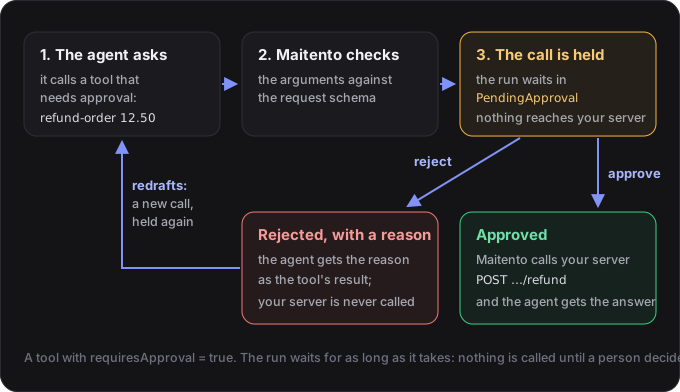
- The call is held. Maitento checks the arguments, then stops instead of calling your server.
- The run waits. Its status becomes
PendingApproval, and itspendingApprovalsays which tool, with which arguments. The run waits for as long as it takes. Any other tool calls the agent made in the same turn wait behind this one. - Approve and Maitento makes the call, gives the agent your server’s answer, and the run carries on.
- Reject with a reason and your server is never called. The agent is told your reason as the tool’s result, and usually redrafts the call, which waits for approval again.
Approvals happen only in interactions, where a run can wait for a person. An app is a program with nobody
to ask: when it calls a tool that needs approval, the call fails with External operation '…' needs a person's approval before it runs, and a program can't wait for one.
1. The refund tool
Section titled “1. The refund tool”The refund connector points at tutorial 9’s server, at POST /orders/{orderId}/refund. Put your tunnel’s address in
place of https://YOUR-SERVER.example.com, in this project’s two connector files, as you did in tutorial 9:
// Replace the host with your orders API's public URL: the tunnel address from tutorial 9.method = "POST"url = "https://YOUR-SERVER.example.com/orders/{orderId}/refund"description = "Refunds part or all of an order"auth = "Header"schema.request = @json("refund-request")parameters.path = [ { name = "orderId" description = "The order id, for example A-1001" }]schema.request is a JSON Schema for the request body. The model fills it in, and Maitento checks it before the call
is held, so a person is only ever asked to approve a well-formed refund:
{ "type": "object", "properties": { "amount": { "type": "number", "description": "Amount to refund, in the order's currency" }, "reason": { "type": "string", "description": "Why the customer is being refunded" } }, "required": ["amount", "reason"], "additionalProperties": false}The tool sends the secret like get-order does, and needs a person’s approval:
connector = @ref("orders-refund")auth = { header = "X-Api-Key" secret = @ref("orders-api-key")}guidance = "Refunds an order. Only refund what the customer asked for, and never more than the order total."// A person must approve every refund before Maitento calls your server.requiresApproval = trueThe agent gets both tools:
// Tutorial 9's support agent, now with a refund tool as well.model = @ref("deepseek.deepseek-v4-flash")prompt = "You are a customer support agent for an online shop. Look orders up before you answer, and be precise about amounts."summary = "Handles order questions and refunds"functions = [ { ref = @ref("get-order") }, { ref = @ref("refund-order") }]2. Ask for a refund
Section titled “2. Ask for a refund”The script checks that the orders-api-key secret exists, deploys the project, and asks for a refund. The run’s
onWaiting callback is called when the run starts waiting for a person: it shows what the agent wants to do, and asks
you.
import { createInterface } from "node:readline";import { Maitento } from "@maitento/sdk";
const mt = new Maitento();
// The tools send the orders-api-key secret that tutorial 9's setup stored, so it must exist before the deploy.if (!(await mt.secrets.findByName("orders-api-key"))) {  throw new Error("Run tutorial 9's setup first: it stores the orders-api-key secret.");}await mt.deploy("../maitento");
const lines = createInterface({ input: process.stdin })[Symbol.asyncIterator]();const ask = async (prompt: string): Promise<string> => {  process.stdout.write(prompt);  const line = await lines.next();  return line.done ? "" : line.value;};
const message = "Hi, order A-1001 arrived but the blue mug was smashed. Could I get a refund of 12.50 for it?";console.log(`Customer: ${message}\n`);
const run = await mt.interactions.run("support", { inputs: { message } }, {  // A refund needs your approval: the run waits with status PendingApproval until you decide.  onWaiting: async (waiting) => {    const approval = waiting.pendingApproval;    if (waiting.status !== "PendingApproval" || !approval) return;
    console.log(`The agent wants to call ${approval.functionName} with ${approval.argumentsJson}`);    const answer = await ask("Approve? (y/n) ");    if (answer.trim().toLowerCase().startsWith("y")) {      await mt.interactionRuns.approve(waiting.id, { approvalId: approval.id });    } else {      const reason = await ask("Why not? ");      await mt.interactionRuns.reject(waiting.id, { approvalId: approval.id, reason: reason || "Not approved" });    }  },});
console.log(`\nSupport: ${run.output}`);process.exit(0);
import sys
from maitento import Maitento
mt = Maitento()
# The tools send the orders-api-key secret that tutorial 9's setup stored, so it must exist before the deploy.if not mt.secrets.find_by_name("orders-api-key"): sys.exit("Run tutorial 9's setup first: it stores the orders-api-key secret.")mt.deploy("../maitento")
def ask(prompt: str) -> str: try: return input(prompt) except EOFError: return ""
message = "Hi, order A-1001 arrived but the blue mug was smashed. Could I get a refund of 12.50 for it?"print(f"Customer: {message}\n")
# A refund needs your approval: the run waits with status PendingApproval until you decide.def on_waiting(waiting): approval = waiting.pending_approval if waiting.status != "PendingApproval" or not approval: return
print(f"The agent wants to call {approval.function_name} with {approval.arguments_json}") answer = ask("Approve? (y/n) ") if answer.strip().lower().startswith("y"): mt.interaction_runs.approve(waiting.id, approval.id) else: reason = ask("Why not? ") mt.interaction_runs.reject(waiting.id, approval.id, reason or "Not approved")
run = mt.interactions.run("support", inputs={"message": message}, on_waiting=on_waiting)
print(f"\nSupport: {run.output}")#:package Maitento.Sdk@26.10.0
using Maitento.Entities.Interactions;using Maitento.Sdk;using Maitento.Sdk.Runs;
await using var mt = MaitentoClient.CreateFromEnvironment();
// The tools send the orders-api-key secret that tutorial 9's setup stored, so it must exist before the deploy.if (await mt.Secrets.GetByNameAsync("orders-api-key") == null) throw new InvalidOperationException("Run tutorial 9's setup first: it stores the orders-api-key secret.");await mt.DeployAsync("../maitento");
string Ask(string prompt){ Console.Write(prompt); return Console.ReadLine() ?? "";}
var message = "Hi, order A-1001 arrived but the blue mug was smashed. Could I get a refund of 12.50 for it?";Console.WriteLine($"Customer: {message}\n");
var inputs = new Dictionary<string, string> { ["message"] = message };var run = await mt.Interactions.RunAsync("support", inputs, new RunOptions<InteractionProcess>{ // A refund needs your approval: the run waits with status PendingApproval until you decide. OnWaiting = async waiting => { var approval = waiting.PendingApproval; if (waiting.Status != InteractionProcessStatus.PendingApproval || approval == null) return;
Console.WriteLine($"The agent wants to call {approval.FunctionName} with {approval.ArgumentsJson}"); var answer = Ask("Approve? (y/n) "); if (answer.Trim().StartsWith("y", StringComparison.OrdinalIgnoreCase)) { await mt.InteractionProcesses.ApproveToolCallAsync(waiting.Id, approval.Id); } else { var reason = Ask("Why not? "); if (reason == "") reason = "Not approved"; await mt.InteractionProcesses.RejectToolCallAsync(waiting.Id, approval.Id, reason); } },});
Console.WriteLine($"\nSupport: {run.Output}");mt deploy ./maitentomt interaction-start support --input-message "Hi, order A-1001 arrived but the blue mug was smashed. Could I get a refund of 12.50 for it?"mt interaction-approve <run id> # prints the call's arguments, then approves itAnswer y:
Customer: Hi, order A-1001 arrived but the blue mug was smashed. Could I get a refund of 12.50 for it?
The agent wants to call refund-order with {"additionalInputs":{"path.orderId":"A-1001"},"request":{"amount":12.5,"reason":"Blue mug arrived smashed"}}Approve? (y/n) y
Support: The refund has been processed successfully.
To confirm: a refund of **£12.50** has been issued for order A-1001 covering the smashed Blue mug. The order total was £34.50, and the total refunded on this order now stands at £12.50. …
Done when: your server prints Refunded 12.5 GBP on A-1001: Blue mug arrived smashed only after you answer
y, and the agent confirms the refund.
While the run waited, its pendingApproval looked like this:
{ "id": "6bc72d64-64f4-43f6-8e3c-813982067cea", "functionName": "refund-order", "argumentsJson": "{\"request\":{\"amount\":5,\"reason\":\"Tea sampler was missing two of its teas (two teas not received)\"},\"additionalInputs\":{\"path.orderId\":\"A-1001\"}}", "toolCallId": "call_00_BkEIFjXX9GpahKxlIC177651", "dateRequested": "2026-10-26T19:58:17.230Z", "status": "Pending", "agentId": "56ba8062-f81e-447b-b76e-984c228ca0d4", "agentName": "Support"}argumentsJson holds the body (request) and the path and query values (additionalInputs), as the model wrote them.
3. Approve or reject from anywhere
Section titled “3. Approve or reject from anywhere”The script answers in the same program that started the run, but it doesn’t have to. Anyone in your tenant can decide,
from any of these, while the run is PendingApproval. Each needs the run’s id and the approval’s id
(pendingApproval.id), which you get by reading the run:
await mt.interactionRuns.approve(run.id, { approvalId: run.pendingApproval.id });await mt.interactionRuns.reject(run.id, { approvalId: run.pendingApproval.id, reason: "Refund the mug only" });mt.interaction_runs.approve(run.id, run.pending_approval.id)mt.interaction_runs.reject(run.id, run.pending_approval.id, "Refund the mug only")await mt.InteractionProcesses.ApproveToolCallAsync(run.Id, run.PendingApproval!.Id);await mt.InteractionProcesses.RejectToolCallAsync(run.Id, run.PendingApproval!.Id, "Refund the mug only");mt interaction-approve <run id>mt interaction-reject <run id> -r "Refund the mug only"curl -X POST https://api.maitento.com/interactions/processes/by-id/<run id>/approve \ -H "Authorization: $MAITENTO_AUTH" -H "Content-Type: application/json" \ -d '{"toolCallApprovalId": "<approval id>"}'curl -X POST https://api.maitento.com/interactions/processes/by-id/<run id>/reject \ -H "Authorization: $MAITENTO_AUTH" -H "Content-Type: application/json" \ -d '{"toolCallApprovalId": "<approval id>", "reason": "Refund the mug only"}'The CLI finds the approval the run is waiting on by itself. An approve returns once your server has answered.
In the portal, open Runs, then the run: the call waiting for approval is at the bottom of the conversation, with its arguments, Approve and run and Reject…. Rejecting asks for the reason.
4. Break it on purpose: reject, with a reason
Section titled “4. Break it on purpose: reject, with a reason”Restart your orders API first. It keeps orders in memory, so the restart undoes step 2’s refund, and the agent won’t see one already made.
Run the script again. This time answer n, and give a reason the agent can act on. Then approve the call it redrafts:
Customer: Hi, order A-1001 arrived but the blue mug was smashed. Could I get a refund of 12.50 for it?
The agent wants to call refund-order with {"request":{"amount":12.5,"reason":"Blue mug arrived smashed (damaged in transit)"},"additionalInputs":{"path.orderId":"A-1001"}}Approve? (y/n) nWhy not? The mug was on sale for 10.00, so refund 10.00, not 12.50.The agent wants to call refund-order with {"additionalInputs":{"path.orderId":"A-1001"},"request":{"amount":10,"reason":"Blue mug arrived smashed (damaged in transit); refunding the £10.00 sale price"}}Approve? (y/n) y
Support: Thank you for the correction. I've processed a refund of £10.00 (the sale price of the blue mug) against order A-1001. That brings the total refunded on the order to £10.00, out of the original order total of £34.50.
Done when: you’re asked twice, your server prints a single Refunded 10 GBP on A-1001: …, and nothing for 12.50.
What happened:
- The rejected call was never sent. The agent got your reason as the tool’s result, with an instruction to make the changed call if the reason asks for a change.
- It worked out the change itself, 10.00 instead of 12.50, and called the tool again. That was a new call, so it
needed a new approval:
onWaitingwas called a second time, with a newpendingApproval.id. - You approved it, and only then did Maitento call your server.
A reason that asks for no change (“We don’t refund damaged items”) makes the agent drop the refund and say so instead.
If it didn’t work
Section titled “If it didn’t work”- The script stops with
Run tutorial 9's setup first. Theorders-api-keysecret doesn’t exist. Run tutorial 9’s setup, which stores it. - The agent says the order was already refunded, and asks nothing. Your server still has an earlier refund in memory. Restart it.
Interaction is not in PendingApproval state. The run isn’t waiting any more: it was already approved or rejected, or it finished. Each approval can be answered once.Tool call approval ID does not match. The id you sent isn’t the approval the run is waiting on, for example one from before a redraft. Read the run again, and use itspendingApproval.id.- The tool result says
Error connecting to remote API. The approval worked, but your server or tunnel isn’t reachable. See tutorial 9.
All the files
Section titled “All the files”On GitHub: examples/10-approvals · TypeScript · Python · C#
All the files in this project (7)
// Tutorial 9's support agent, now with a refund tool as well.model = @ref("deepseek.deepseek-v4-flash")prompt = "You are a customer support agent for an online shop. Look orders up before you answer, and be precise about amounts."summary = "Handles order questions and refunds"functions = [ { ref = @ref("get-order") }, { ref = @ref("refund-order") }]// Replace the host with your orders API's public URL: the tunnel address from tutorial 9.method = "GET"url = "https://YOUR-SERVER.example.com/orders/{orderId}"description = "Looks up one order by its id"auth = "Header"parameters.path = [ { name = "orderId" description = "The order id, for example A-1001" }]// Replace the host with your orders API's public URL: the tunnel address from tutorial 9.method = "POST"url = "https://YOUR-SERVER.example.com/orders/{orderId}/refund"description = "Refunds part or all of an order"auth = "Header"schema.request = @json("refund-request")parameters.path = [ { name = "orderId" description = "The order id, for example A-1001" }]connector = @ref("orders-get")// Maitento sends the secret's value in this header. Your server checks it.auth = { header = "X-Api-Key" secret = @ref("orders-api-key")}guidance = "Looks up an order: its items, total, status and how much has already been refunded."connector = @ref("orders-refund")auth = { header = "X-Api-Key" secret = @ref("orders-api-key")}guidance = "Refunds an order. Only refund what the customer asked for, and never more than the order total."// A person must approve every refund before Maitento calls your server.requiresApproval = trueagent = { name = "Support" agent = @ref("support-agent")}task = "A customer writes: %%message%%"inputs.prompts = [ { name = "message" description = "What the customer wrote" required = true }]{ "type": "object", "properties": { "amount": { "type": "number", "description": "Amount to refund, in the order's currency" }, "reason": { "type": "string", "description": "Why the customer is being refunded" } }, "required": ["amount", "reason"], "additionalProperties": false}Review
Section titled “Review”Your support agent can now refund orders, but only the refunds a person approves. A rejection with a reason sends the agent back to redraft.
- Approvals:
requiresApproval = trueon a tool holds every call to it until a person approves or rejects it. PendingApproval: the run’s status while it waits.pendingApprovalsays which tool, with which arguments.- Approve or reject with the SDKs, the CLI, the API or the portal. A rejection’s reason goes to the agent.
schema.request: a JSON Schema the model fills in, checked before the call is held.- Apps can’t wait for a person, so a tool that needs approval fails when an app calls it.
Challenge: in a real shop, the person approving refunds isn’t sitting next to the customer. Start a refund
request that doesn’t wait (interactions.start or mt interaction-start, as in tutorial 4), and write
an approvals queue: a script that finds every support run waiting for an approval, shows what it wants to do, and
approves or rejects each one.
Hint: runs.list filters runs by type and status, each run it lists names its interaction (definitionName), and
interactionRuns.get returns a run with its pendingApproval.
Done when: the run you started waits, your queue shows its refund, and approving it refunds the order.
The solution is in examples/10-approvals/solution: request starts a
refund, and approvals is the queue.
Run 41a8a6f6-bdb5-4155-a2f9-120b50d6b78c: Support wants to call refund-order with {"request":{"amount":5,"reason":"Tea sampler was missing two of its teas (two teas not received)"},"additionalInputs":{"path.orderId":"A-1001"}}Approve? (y/n) yNothing else is waiting.Next: 11. Know when it’s done has Maitento call your server when a run changes, for example when one starts waiting for an approval.
