

4. Install an SDK or the CLI
Use whichever suits you. They all do the same things, and the docs show each one side by side.
# Node.js 20 or later, Bun, Deno or a modern browser. No other dependencies.npm install @maitento/sdk# Python 3.10 or later.pip install maitento# .NET 8 or later.dotnet add package Maitento.Sdk# The mt command line. Needs the .NET 8 (or later) runtime.dotnet tool install --global Maitento.Shellmt helpUsing another language
Section titled “Using another language”Every SDK is a thin layer over the Maitento HTTP API, and every API call in the reference
shows the plain HTTP request and the curl command. Authenticate with the Authorization: ApiKey <user id> <secret>
header from step 2, send and receive JSON, and you can use Maitento from
anything.
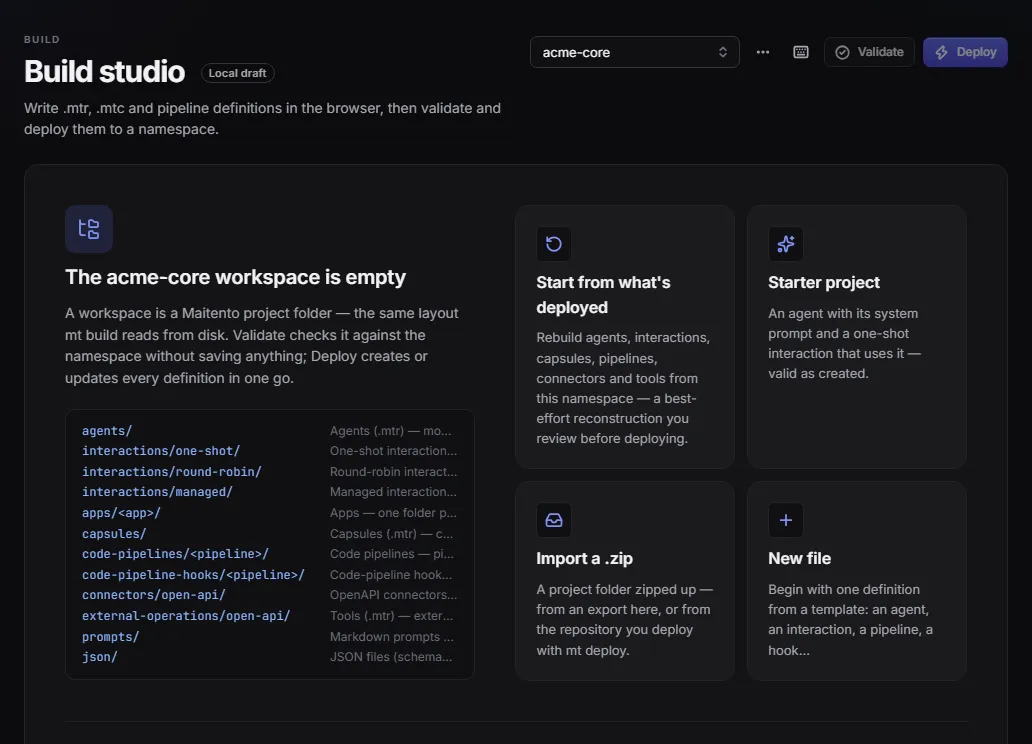
The portal’s Build studio
Section titled “The portal’s Build studio”You don’t need to install anything to write and deploy agents: the portal’s Build studio has an editor with the
same folder layout as a project on your disk, with Validate and Deploy buttons. You can import and export a
project as a .zip.
Next: 5. Run your first agent.
