

2. Create an API key
Your code signs in to Maitento with an API key. It acts as you, with your permissions.
-
In the portal, open Settings → API keys and choose Create API key. Give it a name, and an expiry date if you like.
-
Copy the line labelled Environment variable:
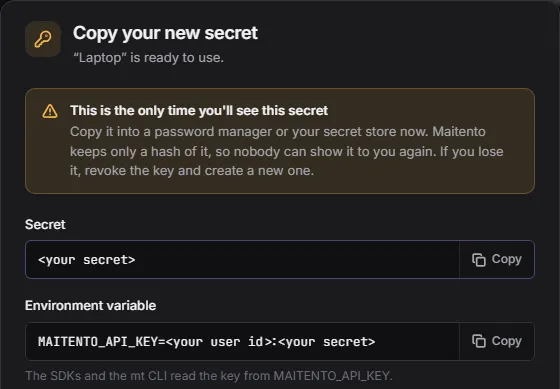
It looks like this:
MAITENTO_API_KEY=<your user id>:<your secret>It’s two values joined by a colon: your user id, and the key’s secret. The secret is shown only this once, so put it somewhere safe, such as a password manager or your secret store.
Set the environment variables
Section titled “Set the environment variables”The SDKs and the mt command line read the key from MAITENTO_API_KEY, and the namespace to work in from
MAITENTO_NAMESPACE. The tutorials use a namespace called tutorials:
export MAITENTO_API_KEY="<user id>:<secret>"export MAITENTO_NAMESPACE="tutorials"$env:MAITENTO_API_KEY = "<user id>:<secret>"$env:MAITENTO_NAMESPACE = "tutorials"Check it works
Section titled “Check it works”import { Maitento } from "@maitento/sdk";
// Reads your API key from MAITENTO_API_KEY.const mt = new Maitento();
// Who the key belongs to, and which models you can use.const me = await mt.users.self();console.log(`Signed in as ${me.user.name} <${me.user.emailAddress}> in ${me.tenant.name}.`);
const models = await mt.models.list();console.log(`${models.length} models available, for example ${models.slice(0, 3).map((m) => m.name).join(", ")}.`);from maitento import Maitento
# Reads your API key from MAITENTO_API_KEY.mt = Maitento()
# Who the key belongs to, and which models you can use.me = mt.users.self()print(f"Signed in as {me.user.name} <{me.user.email_address}> in {me.tenant.name}.")
models = mt.models.list()print(f"{len(models)} models available, for example {', '.join(m.name for m in models[:3])}.")#:package Maitento.Sdk@26.10.0
using Maitento.Sdk;
// Reads your API key from MAITENTO_API_KEY.await using var mt = MaitentoClient.CreateFromEnvironment();
// Who the key belongs to, and which models you can use.var me = await mt.Users.GetSelfAsync();Console.WriteLine($"Signed in as {me.User.Name} <{me.User.EmailAddress}> in {me.Tenant.Name}.");
var models = await mt.AiModels.GetAllAsync();var examples = string.Join(", ", models.Take(3).Select(m => m.Name));Console.WriteLine($"{models.Length} models available, for example {examples}.");mt api-login key "$MAITENTO_API_KEY"mt aimodel-listexport MAITENTO_AUTH="ApiKey ${MAITENTO_API_KEY/:/ }"curl https://api.maitento.com/users/self -H "Authorization: $MAITENTO_AUTH"Signed in as Ana Silva <ana@example.com> in Acme.51 models available, for example anthropic.fable-5, anthropic.fable-5.1, anthropic.haiku-4.5.Calling the API directly
Section titled “Calling the API directly”Without an SDK, send the key in the Authorization header: the word ApiKey, your user id, and the secret,
separated by spaces:
Authorization: ApiKey <your user id> <your secret>The curl examples in these docs use $MAITENTO_AUTH, set as above. ${MAITENTO_API_KEY/:/ } swaps the colon for a
space.
Keeping keys safe
Section titled “Keeping keys safe”- One key per use. Make separate keys for your laptop, CI and each service, so you can revoke one without breaking the others.
- Never put a key in source code or a project file. Use your platform’s secret store.
- Revoke a key you no longer need, or one that may have leaked, from Settings → API keys.
Next: 3. Add a model key.
